
Guide for Online Renewal of Your Membership
If you already set up your membership portal last year, then all you need do is enter your email address then click on confirm identity. On the next screen enter your password and click on confirm identity. If you have forgotten your password then click on “forgotten password”.
Please add noreply@u3abeacon.org.uk to your email address book/contact list to ensure you receive U3A messages and they are are not treated as spam
If you are a new member or you haven’t set up a membership portal, when you click on Membership Renewal you will reach a screen which asks you to enter your email address. Enter your email address and click on Confirm Identity. Follow the instructions there.

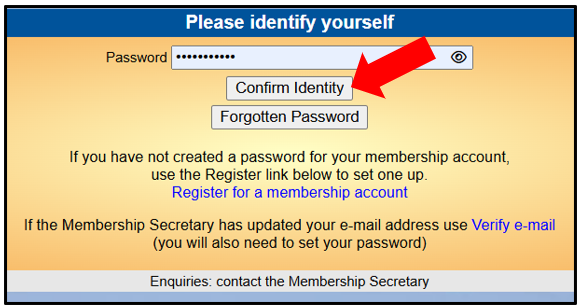
If you have entered your details incorrectly, the screen will clear and you will not be able to progress. (Common problems include not being aware that information entered is case sensitive and allowing auto-fill to fill in your details which can result in unseen spaces being added.)
Follow the instructions to set up your password. Note this includes responding to a separate email from Beacon to confirm your email address and password. Then click on confirm identity.
- You will then be taken to a payment screen which shows the amount due for your renewal.
Please make sure that you tick the correct tick box concerning your Gift Aid status
Click on Make Payment. - The next screen is the PayPal screen. You do not need a PayPal account.
- If you do have a PayPal account you may log in and pay this way. If you do not have a PayPal account or do not wish to use PayPal, enter your email address and go to the link right at the bottom of the screen Pay by Debit or Credit Card. Click on this.
- On the next screen enter your email address and click on “continue to payment”.
- This takes you to another screen where you must enter your personal details and credit or debit card details.
- If you don’t have a PayPal account, and don’t wish to create one, to make your credit card payment you need to turn off the “Save information & create your PayPal account” slider. This will then give you the option to “Pay now as guest”.
The screenshot below shows this slider being turned off, and the “Pay now as guest” option appearing, allowing you to pay without a PayPal account.

- After the transaction has been successfully completed you will see a confirmation on the screen.
- You will receive an email from PayPal confirming the transaction followed by an email from Beacon (our membership system) confirming your renewal with your new membership card attached.
- To save your membership card to your phone watch the following video: https://youtu.be/NpuSsAN4U6M
NB If you are a couple who are not portal registered (or one of you is a new member) but you have the same email address then the first person follows the procedure as above. The second person enters their email address BUT DOES NOT click on confirm email address or confirm identity, but instead clicks on register for a membership account.
To renew your membership click on Membership Renewal and choose the renewal option.
If you encounter any problems please email the Membership Secretary at members@farnhamu3a.org.uk
Cheque Payments
Online membership renewal is our preferred method of payment as it is automatic and creates far less work for our Treasurer & Membership Secretary. If you have problems, please email the Membership Secretary at members@farnhamu3a.org.uk for assistance.
However, if you really feel you cannot manage online payment, please send a cheque for £50 payable to Farnham u3a and send to:
Farnham u3a Treasurer at:
17 Kestrel Close, Farnham, Surrey GU10 5TW
Please write your name(s) and membership number(s) on the reverse of the cheque.